Citation Generator

Free APA Citation Generator: Generate Bibliography

Search for a source using a URL, DOI, title or keywords, or enter the source details manually.

Find Your Source

Simple and Fast

How to Use Our APA Citation Generator

Create an APA citation in a few simple steps. Search for your source, review the available information, and generate a formatted citation without entering every detail manually.

01

Select Your Source Type, Style & Search Term

Start by selecting the type of source you want to cite and the APA edition you need. Then enter a title, keyword, DOI, or URL to search for your source.

Choosing the correct source type and citation style helps the generator use the appropriate formatting rules for your reference.
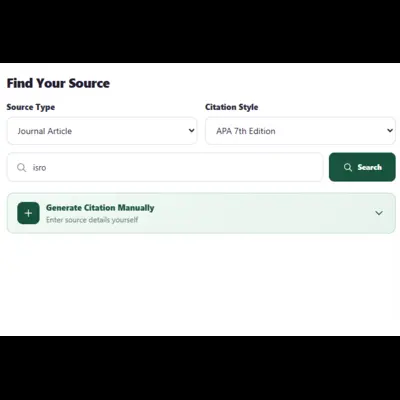
Select source type, APA citation style, and search term
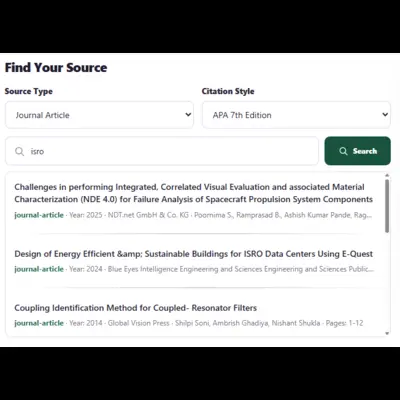
Review and select a search result for APA citation
02

Review and Select the Right Search Result

Review the search results and find the publication that matches the source you want to cite. Check the title, author, publication date, and other available details before continuing.

Selecting the correct result helps ensure that the citation is created from the right source information.

03

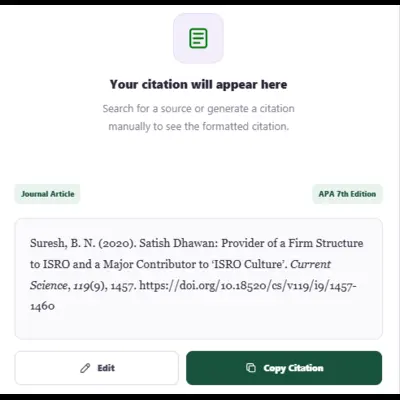
Generate and Copy Your APA Citation

Once you have selected the correct source, generate your APA citation. The generator formats the available source information according to the APA edition you selected.

Review the generated reference, make any necessary checks, and copy the citation to your paper, bibliography, or reference list.

Generate and copy an APA citation
APA Editions

We Support the Latest Formats

Our APA citation generator is designed around the APA citation formats available in your generator, making it easier to select the edition required for your assignment, paper, or reference list.

APA 6th Edition

Generate citations in APA 6th edition when an assignment, publication, archive, or institutional requirement specifically calls for the previous edition.

APA 6

APA 5th Edition

Older academic materials may still require APA 5th edition. Select this format when you need to reproduce a reference according to that edition.

APA 5
APA Referencing

What Is an APA Citation?

An APA citation is a reference to a source used in academic, professional, or research writing. APA style helps readers identify the work being cited and locate the original source.

An APA reference commonly includes information such as the author's name, publication date, title, and publication details. Depending on the type of source, it may also include a journal volume and issue, page range, publisher, DOI, or URL.

The information required can vary according to the source type. A journal article, book, website, report, and other sources do not necessarily use exactly the same reference structure. That's why selecting the correct source type before generating a citation is important.

01
Identify the source

Determine what type of work you are citing.

02
Collect the details

Use the available author, date, title, and publication information.

03
Format the reference

Apply the selected APA edition to the source information.

Frequently Asked Questions

APA Citation Generator FAQs

Find answers to common questions about generating APA citations with our online citation generator.

What is an APA citation generator?

An APA citation generator is a tool that formats source information into an APA-style reference. It can help organize information such as authors, publication dates, titles, journal details, DOI information, and URLs into a citation format.

Which APA edition should I use?

APA 7th edition is the current edition of the APA Publication Manual. However, you should follow the edition specified by your instructor, institution, journal, or publication requirements.

Can I cite a website in APA format?

Yes. Websites can be cited in APA style when the required source information is available. Depending on the page, relevant information may include the author or organization, publication date, page title, website name, and URL.

Can I use a DOI to create an APA citation?

Yes. A DOI can be used to identify a scholarly source and provide a persistent link to the publication. Enter the DOI in the search field when it is available.

Can I create an APA citation manually?

Yes. Use the Generate Citation Manually option above to enter the source details yourself. This is useful when a source cannot be found through the search options or when you want to review the information before generating the reference.

Is the generated APA citation ready to use?

The generated reference is formatted from the source information available to the generator. Always review the result against your instructor's, institution's, journal's, or publication's requirements, especially when source metadata is incomplete or ambiguous.