Citation Generator

Free Chicago Citation Generator: Generate Bibliography

Search for a source using a URL, DOI, title or keywords, or enter the source details manually.

Find Your Source

Simple and Fast

How to Use Our Chicago Citation Generator

Create a Chicago citation in a few simple steps. Choose your source, find the correct publication, review the available details, and generate a formatted citation for your paper or bibliography.

01

Select Your Source Type, Style & Search Term

Choose the source type you want to cite and select the Chicago format required for your work. Then enter a title, keyword, DOI, or URL to search for the source.

Selecting the correct Chicago system at the start helps the generator format the retrieved source information for the style you need.
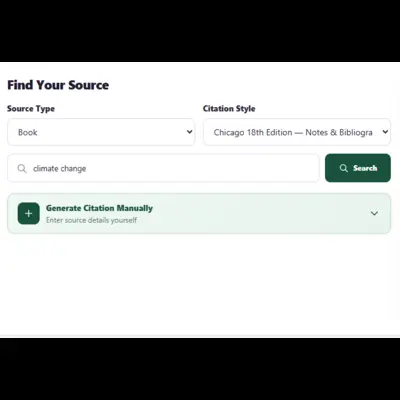
Select source type, Chicago citation style, and search term
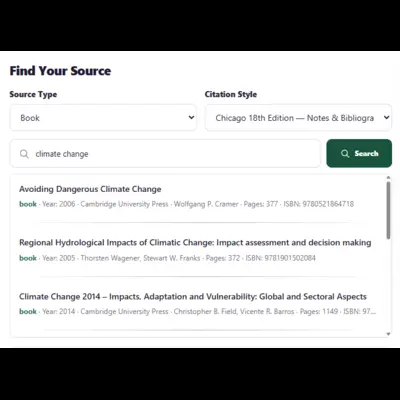
Review and select a search result for a Chicago citation
02

Review and Select the Right Search Result

Review the search results and choose the publication that matches the source you want to cite. Check the title, author, publication, date, and other available details before continuing.

This review step helps reduce errors caused by selecting a similar publication or relying on incomplete source information.

03

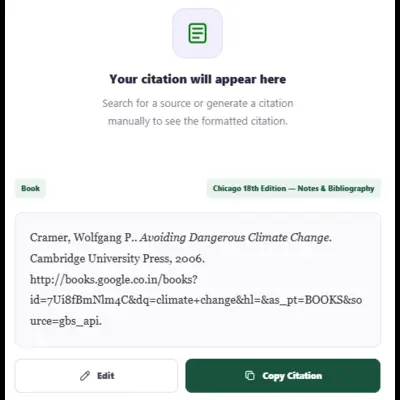
Generate and Copy Your Chicago Citation

After selecting the correct source, generate your Chicago citation. The generator formats the available information according to the Chicago style selected in the citation style field.

Review the finished citation, make any final checks required for your assignment or publication, and copy the result into your work.

Generate and copy a Chicago citation
Chicago Editions

We Support the Latest Formats

Choose the Chicago edition and documentation system required for your work. The current Chicago Manual of Style is the 18th edition, which provides both Notes and Bibliography and Author-Date systems.

Chicago 17th Edition

A previous Chicago edition that may still be required when an instructor, institution, or publication specifically requests it.

  • Author-Date
  • Notes & Bibliography
Which Chicago system should you choose?

Chicago offers two documentation systems. Notes and Bibliography uses numbered notes with a bibliography, while Author-Date uses parenthetical in-text citations with a reference list. Students should follow the system required by their instructor, institution, or publisher.

Chicago Citation Basics

What Is a Chicago Citation?

A Chicago citation is a way of documenting information and sources used in academic, professional, and published writing. Chicago style supports two main documentation systems: Notes and Bibliography and Author-Date.

In Notes and Bibliography, sources are documented with numbered footnotes or endnotes and are commonly listed in a bibliography. In Author-Date, sources are cited briefly in the text and matched to a reference list.

01

Identify the source

Start with the book, article, website, report, or other source you need to document.

02

Collect the source details

Use the available author, title, date, publisher, journal, DOI, URL, and other relevant information.

03

Apply the selected system

Choose the Chicago edition and documentation system required for your assignment or publication.

Frequently Asked Questions

Questions About Chicago Citations?

Find answers to common questions about Chicago citation systems, editions, source searches, and generated citations.

What is a Chicago citation generator?

A Chicago citation generator helps format source information into citations based on the Chicago edition and documentation system you select.

What are the two Chicago citation systems?

Chicago provides Notes and Bibliography and Author-Date. Notes and Bibliography uses numbered notes and commonly a bibliography, while Author-Date uses parenthetical in-text citations and a reference list.

Which Chicago edition should I use?

Use the edition and documentation system required by your instructor, institution, or publisher. If no specific requirement is given, check the current Chicago guidance before selecting an edition.

Can I cite a website in Chicago style?

Yes. Chicago provides guidance for documenting websites and other online sources. Enter the available source information or search by URL, title, or keywords to begin.

Can I use a DOI to create a Chicago citation?

Yes. You can enter a DOI when the source provides one. The generator can use the available publication information to create the selected Chicago citation.

Should I review a generated Chicago citation before using it?

Yes. Review the source details and the finished citation against your assignment, institutional instructions, or publication requirements, especially when the retrieved source information is incomplete.